6. Graphical User Interface (GUI)
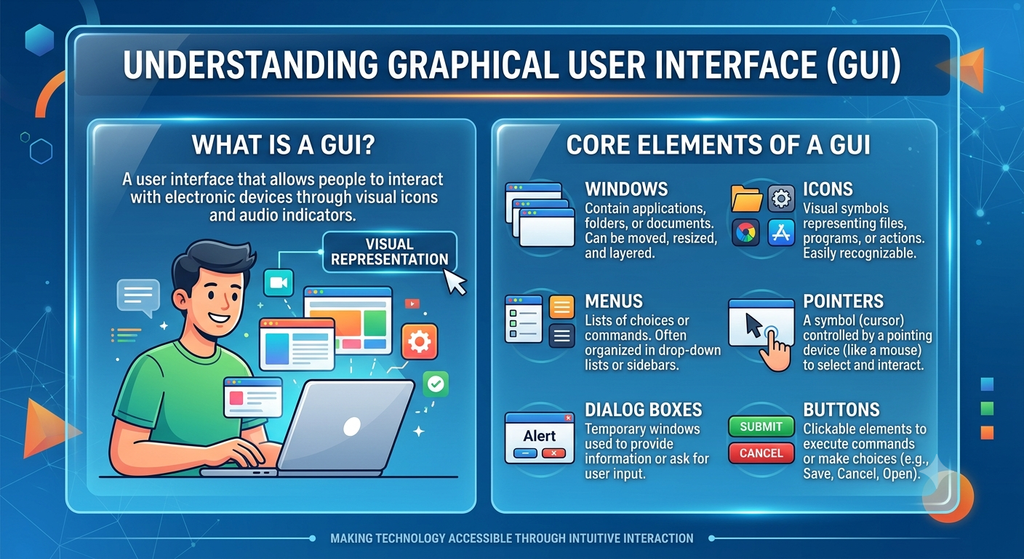
A Graphical User Interface (GUI) is a type of user interface that allows people to interact with a computer through graphical elements.
These elements include icons, menus, buttons, windows, and a pointer controlled by a mouse or another pointing device.
For example, to open a picture in a graphical interface, a user can locate its icon and double-click it rather than type a command.
Features of a GUI
The main features of a graphical user interface are:
- Icons: Small graphical symbols that represent files, folders, applications, or system functions.
- Menus: Lists of commands or options from which the user can make a selection.
- Windows: Rectangular areas in which applications and documents are displayed.
- Pointer: An on-screen indicator used to select and interact with objects.
- Buttons: Graphical controls used to perform actions.
- Dialog boxes: Small windows that display information or request user input.
Advantages of a GUI
A GUI is generally easy to learn and use. It allows users to select options visually instead of memorizing many commands. It also makes applications and documents easier to locate and manage.
GUI and Command-Line Interface
A command-line interface allows users to interact with the computer by entering text commands. A GUI mainly uses graphical elements.
Both interfaces are useful. However, a GUI is particularly convenient for beginners because many common tasks can be performed through visible menus, icons, and buttons.