The following is a single combined article containing all three topics, organized with clear headings and simple steps so it is easy to copy and paste.
1. Two Ways to Change to Slide Show View
Slide Show view displays a presentation in full-screen mode.
Method 1: Using the Slide Show Tab
- Open the PowerPoint presentation.
- Click the Slide Show tab.
- Select From Beginning to start from the first slide or From Current Slide to start from the selected slide.
Method 2: Using the Keyboard
- Press F5 to start the slide show from the beginning.
- Press Shift + F5 to start from the current slide.
To exit Slide Show view, press Esc.

2. Steps to Insert a Text Box in a Slide
A text box is a container that allows users to add text at a specific location on a slide. It is useful for inserting captions, labels, and additional information.
Follow these steps:
- Open the slide where you want to insert text.
- Click the Insert tab on the Ribbon.
- Click Text Box.
- Move the pointer to the desired location on the slide.
- Click and drag the mouse to draw the text box.
- Type the required text inside the box.
- Adjust the text box’s size, position, font, and color as needed.
3. How to Change the Amount of Space Between Lines in a Text Box
Line spacing is the vertical distance between lines of text. Adjusting it improves readability and helps organize slide content.
Follow these steps:
- Select the text box and highlight the text whose line spacing you want to change.
- Click the Home tab.
- In the Paragraph group, click Line Spacing or Line and Paragraph Spacing.
- Choose a suitable option, such as Single, 1.5 Lines, or Double.
- For more precise control, open the Paragraph dialog box and adjust the line-spacing settings.
- Click OK, if applicable, to apply the changes.
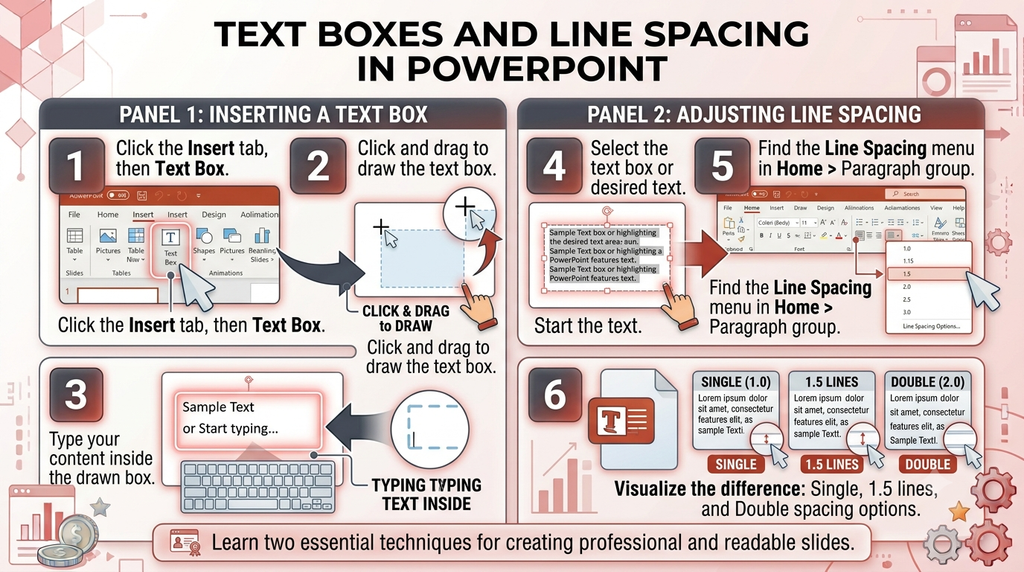
The selected text will display with the chosen amount of space between lines.
Conclusion
Slide Show view helps display a presentation, text boxes allow flexible placement of text, and line-spacing controls improve readability. These three features help users create and deliver well-organized PowerPoint presentations.