Types of Data That Can Be Entered into Worksheet Cells in Microsoft Excel
Introduction
Microsoft Excel is a spreadsheet application used to enter, organize, calculate, and analyze data. A worksheet consists of rows and columns, and their intersections form cells. Each cell can contain different types of information depending on the user’s requirements.
The main types of data commonly entered into worksheet cells are text, numbers, and formulas or functions. Dates and times can also be entered and are generally handled by Excel as numerical values with date or time formatting.

1. Text Data
Text data consists of letters, words, symbols, and combinations of characters. It is commonly used for headings, labels, names, addresses, and descriptions. Text helps identify and explain the information stored in a worksheet.
Examples:
- Student Name
- Employee Details
- Product Description
- Hyderabad
- Employee ID 1025
Text entries are often used as headings or labels for numerical information. Identification numbers and telephone numbers may also need to be stored as text when they should not be used in mathematical calculations.
2. Numerical Data
Numerical data consists of values used to represent quantities and perform calculations. It includes whole numbers, decimal numbers, negative numbers, and values displayed as currency or percentages.
Examples:
- 250
- 1250.75
- -50
- ₹5,000
- 75%
Excel can perform mathematical operations on numerical values. Users can add, subtract, multiply, divide, and calculate totals or averages using these values.
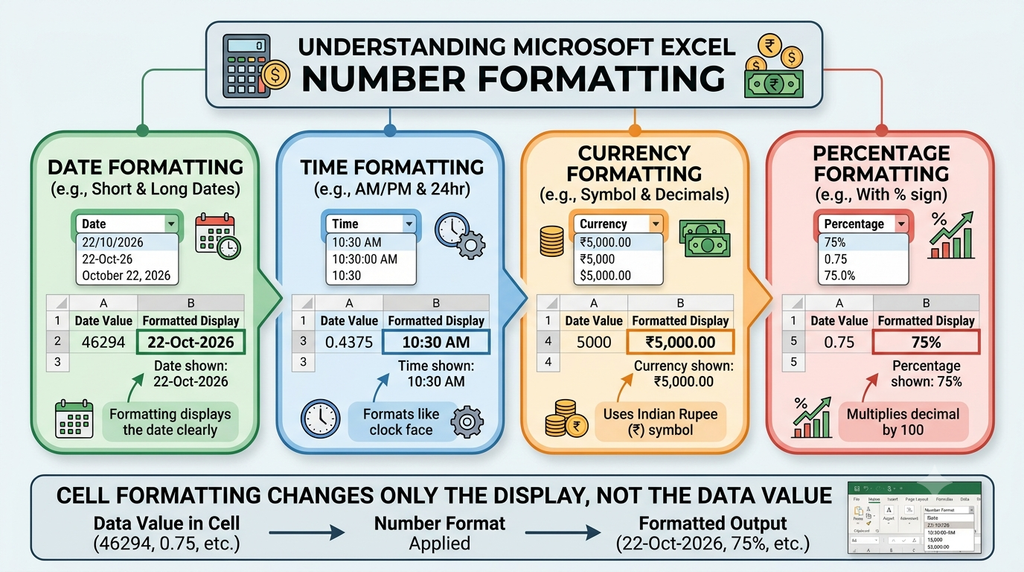
Dates and times can also be entered into worksheet cells. Excel recognizes supported date and time entries and can use them in calculations, such as calculating the number of days between two dates.
3. Formulas and Functions
Formulas are expressions used to perform calculations in Excel. A formula generally begins with an equal sign (=) and can contain numbers, cell references, mathematical operators, and functions.
Functions are predefined formulas that simplify common calculations.
Examples:
=A1+B1adds the values in cells A1 and B1.=B2*C2multiplies the values in cells B2 and C2.=SUM(C2:C10)calculates the total of the values in cells C2 through C10.=AVERAGE(D2:D10)calculates the average of the specified values.
When the values used by a formula change, Excel recalculates the result automatically when calculation is enabled.

Example of Different Data Types in a Worksheet
A school may use Excel to maintain student marks. The worksheet could contain the following information:
| Student Name | Marks | Result |
|---|---|---|
| Aarav | 80 | Pass |
| Priya | 92 | Pass |
| Rahul | 65 | Pass |
In this example, student names and result labels are text, while marks are numerical values. A formula such as =SUM(B2:B4) can calculate the total marks of the three students.
Importance of Entering Data Correctly
Entering the correct type of data is important for accurate calculations and effective record management. Text is useful for descriptions and identification, numerical values are used for calculations, and formulas help automate mathematical operations.
Users should also check cell formats when entering dates, telephone numbers, identification codes, and other values that may be interpreted differently by Excel.
Conclusion
Microsoft Excel supports different types of information in worksheet cells. The three commonly taught categories are text, numerical values, and formulas or functions. Dates and times are also important forms of worksheet data. Understanding these types helps users enter information correctly, perform calculations, and maintain accurate records.