
Difference Between a Workbook and a Worksheet in Microsoft Excel
Introduction
Microsoft Excel is a spreadsheet application used to organize, calculate, and analyze data. Two important components of Excel are the workbook and the worksheet. Although these terms are closely related, they have different meanings and functions.
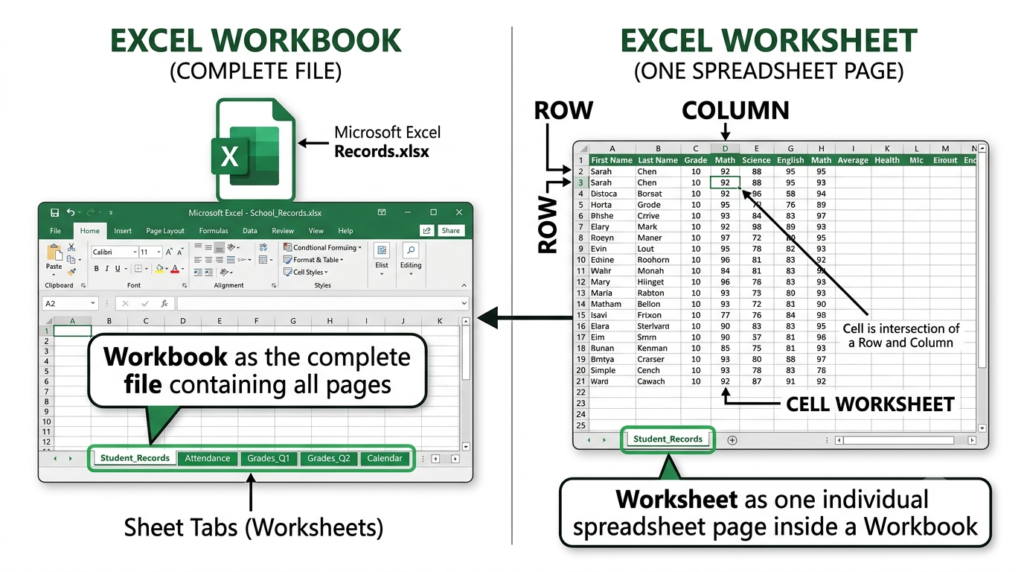
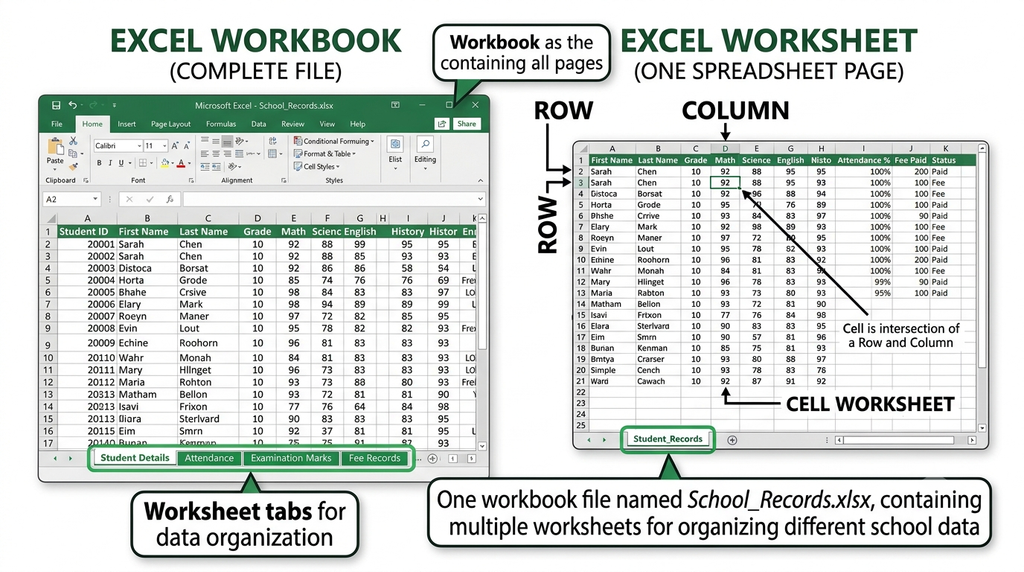
A workbook is the complete Excel file, whereas a worksheet is an individual spreadsheet page within that file. Understanding the difference helps users organize information efficiently and manage their data properly.
What Is a Workbook?
A workbook is an Excel file that contains one or more worksheets. It acts as a container for related information and can be saved on a computer or other supported storage location.
A workbook allows users to keep different sets of related data together in a single file. Each workbook has a file name and is commonly saved in the .xlsx format.
For example, a workbook named School_Records.xlsx may contain worksheets for student details, attendance, examination marks, and fees.
What Is a Worksheet?
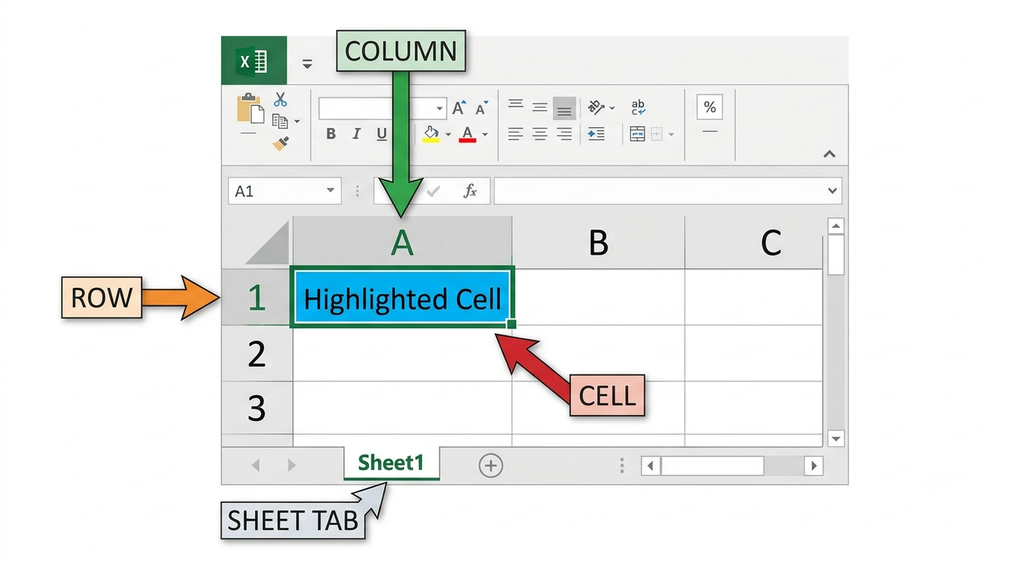
A worksheet is an individual spreadsheet page inside a workbook. It consists of rows and columns, and their intersections form cells. Users enter text, numbers, dates, and formulas into these cells.
Each worksheet has a sheet tab at the bottom of the Excel window. Users can add, rename, move, copy, or delete worksheets as required.
For example, a worksheet named Student Marks may contain student names, roll numbers, subject marks, and total marks.
Main Differences Between a Workbook and a Worksheet
| Workbook | Worksheet |
|---|---|
| A workbook is the complete Excel file. | A worksheet is an individual spreadsheet page inside a workbook. |
| It can contain one or more worksheets. | It contains rows, columns, and cells for entering data. |
It is identified by a file name, such as School_Records.xlsx. | It is identified by a sheet tab name, such as Student Marks. |
| It is used to store and organize related worksheets together. | It is used to enter, calculate, format, and analyze data. |
| It is saved as an Excel file. | It is stored as part of a workbook. |
Example of a Workbook and Worksheets
Suppose a school maintains its records in a workbook named School_Records.xlsx. The workbook contains the following worksheets:
- Student Details – Stores students’ names, roll numbers, and contact information.
- Attendance – Maintains daily attendance records.
- Examination Marks – Stores subject-wise marks and calculates totals.
- Fee Records – Tracks fee payments and outstanding balances.
All four worksheets belong to the same workbook. This arrangement keeps related school information organized in one file.
Advantages of Using Multiple Worksheets
Using multiple worksheets within a workbook provides several benefits:
- Better organization: Different categories of information can be stored on separate sheets.
- Easy navigation: Users can switch between worksheets using the sheet tabs.
- Simplified calculations: Formulas can refer to data stored on other worksheets in the same workbook.
- Convenient reporting: Related records can be maintained together in one file.
- Easier maintenance: Individual worksheets can be renamed, moved, copied, or updated when necessary.
Conclusion
A workbook is the complete Excel file, while a worksheet is an individual spreadsheet page contained within it. A workbook can include multiple worksheets for organizing related information. Understanding this distinction helps users maintain records, perform calculations, and manage spreadsheet data more effectively.